
MiCA
Download easyMiCA.xlsb and run!
Generator of MiCA White Paper, open-source, fully powered version, with additional features such as:
- Unlimited size of textBlocks for detailed paragraphs or explanations
- Customization with company’s colors, fonts and logo
- Built-in translation to the 24 European language
- Template check with built-in validation rules
- Full iXBRL validation with open-source suite Arelle
Please contact info@easyesef.eu for further details and a customized demo of our easyMiCA solution
Markets in Crypto-Assets (MiCA)
The Market in Crypto-Asset regulation ((EU) 2023/1114) lays down uniform requirements for the offer to the public and admission to trading on a trading platform of crypto-assets other than asset-referenced tokens and e-money tokens (OTHR), of asset-referenced tokens (ART) and of e-money tokens (EMT).
The MiCA White Paper Taxonomy 2025, published by ESMA, includes the MiCA Taxonomy 2025, MiCA XBRL Taxonomy documentation, MiCA XBRL validation rules, MiCA White Paper Reporting Manual and three executable Excel programs in the Annex – Show Case: simple Excel-based solution to generate White Papers in iXBRL with three executable files: SCWP – for EMT token.xlsm SCWP – for ART token.xlsm and SCWP – for OTHR token.xlsm
These three executable programs are powered by the open source Really Easy Converter from Excel to iXBRL (RECEiX), published at openfiling.info/ixbrl The same team created this easyMiCA program.
Although the easyMiCA programme is based on the same open-source RECEiX software, and draws inspiration from the design of the three aforementioned executables, it offers a comprehensive solution, enhanced with support for 24 languages, with all technical limitations resolved, and a simplified User Interface designed to provide an excellent User Experience.
Instructions of use
Configure the White Paper template on the sheet Dashboard:
(1) Click on the T4-EMT, T3-ART, T2-OTHER Token
(2) Click on the applicable part(s) for the token: EMT: A27. ART: AA.1, AA.2. OTHER: A, B, C
(3) Set the number of occurrences (from 1 till 50) of Members of management body, Host member states, and Details of persons.
(4) Decide to Show/hide ordinal numbers (#) as well as to add (or not) a header row for each ordinal number.
The programme will present the selected template (T2, T3, T4), automatically adjusted based on the data you have entered. You can readjust it at any time.
Complete the template. If necessary, feel free to revisit and modify the template configuration, in any moment, using the sheet Dashboard.
Once the template is filled out, click the “Export” button to produce the final document. Validation is a built-in function.
Installation
Download the open-source Excel workbook easyMiCA.xlsb in a Windows computer with Excel license. If troubles with firewalls when downloading an executable programme, try with this easyMiCA.zip compressed version.
Check the downloaded Excel workbook is clean with virustotal.com Full description of security protections here.
If Windows asks for security permission to run Excel macros (as “all the macros may be disabled” or “blocked macros from running”), then open “Windows File Explorer”, select the Excel file, press down on the right-hand button of the mouse and click on “Properties”. Click on “Unblock” on the bottom at right. Open again the Excel file and run again.
Select your language. If other than English, click on “Reset” button to rebuild the templates from scratch. Default texts will be prepared in the selected language.
Put the logo of the company, optionally, as favicon: small image displayed next to the page title in the browser tab.
Languages
This file is provided in the 24 EU languages. As specified in the Market in Crypto-Assets regulation (Regulation (EU) 2023/1114, MICA,), a crypto-asset white paper must be drawn up in an official language of the home Member State and, where relevant, in an official language of the Host Member State, or in a language customary in the sphere of international finance (English language).
Tip: If you need a White Paper in national language, and a cloned White Paper in English, first prepare and Export the White Paper in the national language, then select English language in the program, now adjust the texts, and finally Export the English White Paper. That’s all.
Fields: text and textBolck
Each text field only references a single Excel cell.
Each textBlock field references an unlimited set of consecutive rows, default 2, minimum 1. If you need additional rows, simply insert new rows between the default rows. The cells of the rows belonging a textBlock may be merged in whatever configuration.
In Microsoft Excel, a cell can contain up to 32,767 characters, accessible and editable in the formula bar, but such Excel cell shows up to only 1,024 characters. The resulting iXBRL file will show in full all the characters, without limitation. In a textBlock, create the number of cells/rows you need, as explained.
Taxonomy Illustrated MiCA
The MiCA Taxonomy Illustrated is a document published in Excel that displays the MiCA Taxonomy’s content.
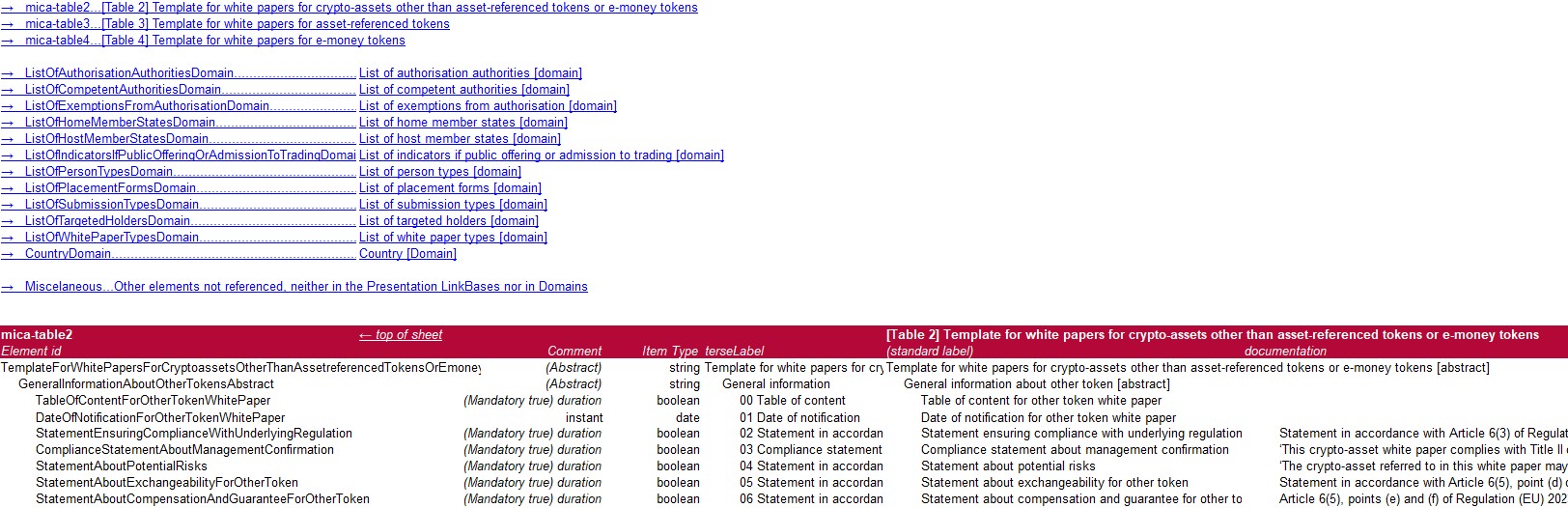
The MiCA Taxonomy Illustrated includes links to enable users to navigate from an MiCA Taxonomy element directly, displaying it in its presentation position, iXBRL characteristics, and the official translation of the label into all European languages.
The MiCA Taxonomy Illustrated is a open source deliverable developed and kindly contributed by the easyESEF’s team. See details at openfiling.info/ixbrl

Disclaimers
easyESEF Ltd. is making this file available to ease generation of white papers. By using this file, you acknowledge and agree to the following:
No Warranty – This file is provided “as is” and without any warranty of any kind, either expressed or implied, including but not limited to warranties of merchantability, fitness for a particular purpose, non-infringement, and technical performance. Users should control and validate the output generated by the tool ahead of submitting the white papers to national competent authorities.
No Liability – easyESEF Ltd. accepts no responsibility or liability for the white paper generated by the file and/or for any loss, damage, costs, or expenses arising out of or in connection with the use of this file, including any reliance placed upon it, operational issues, or errors resulting from its use. The users of the file must carefully control the output generated by it to ascertain that no errors are generated.
User Responsibility – Users of this file remain solely responsible for ensuring the suitability, accuracy, and compliance of their white papers with MiCA and technical standards relevant to their activities, including compliance with the format indicated in Commission Implementing Regulation (EU) 2024/2984.
No Guarantee of Future Updates – easyESEF Ltd. makes no commitment to update, maintain, or support this file, and reserves the right to modify or withdraw it at any time without notice. easyESEF Ltd. offers Guarantee of Future Updates only by contract,
No support – easyESEF Ltd. will not carry out any kind of user support for this file. easyESEF Ltd. offers support only by contract.